Creating effective and beautiful packages and shipping containers for your business is a complex process. While the goal is designing custom packaging that fit your products, it is vital for the visual elements to meet all the manufacturing and legal specifications before producing the custom packaging.
In the process of creating packaging for your company, cutting lines are crucial. Whether you want cusom boxes or any other types of custom packaging, you need vector art with all visual elements captured in the digital file.
Probably you are asking yourself: what is a cutting line? this article will provide details on what a cutting line is, how to design one, and the benefits of using a cutting line.
What Is a cutting line in Packing Box? You can create a cutting line to include the relevant notes, markings, and cut lines needed in your custom bags , envelopes, brochures , and other custom packaging. A cutting line is usually created by a packaging designer or graphic designer. They can be used in different types of packaging.
After answering what a cutting line is in packaging, it is essential to understand how to design or give a correct layout of your cutting line.
cutting line Design: What You Need to Know Packaging designers are equipped with skills that help them create amazing cutting lines for all types of custom packaging.
If you have a design concept for your packages, you need someone who can create a proper layout to guarantee the quality outcome in the final packaging. It is usually a challenge for untrained people to produce mathematically described lines using design software.
To ensure that you are on the right track, it is important to get a package that resembles your designed custom package or box. Creating proper cutting lines will be easier if you take the correct measurements.
The goal is to ensure that visual elements are correctly organized with a fold line and glue table. The cut lines should also be located away from the edges of the final packaging to give an appealing look.
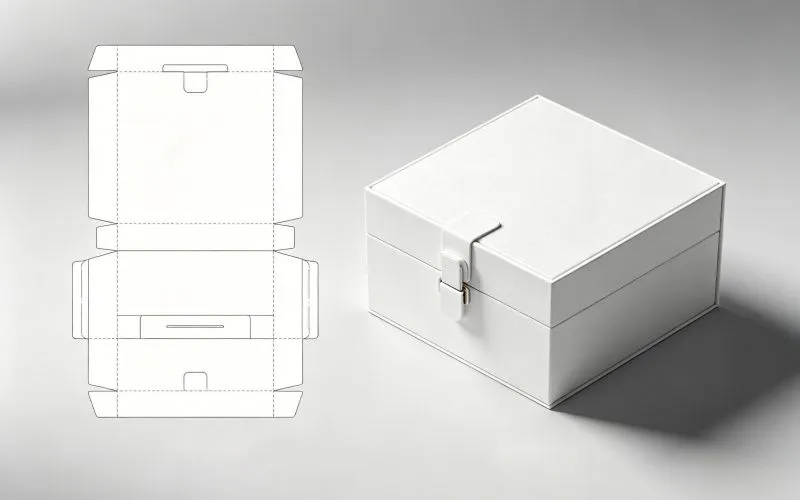
After you choose a company to oversee your packaging process, it is important to send them an idea of how you want your packages to look. You can check the flat packaging from the sample to see where the artwork markings should be.
After highlighting the design measurements, you can start the process by working alongside a team of graphic designers. In most instances, you might find a creative team of your printing company using design software like Adobe Illustrator .
Can I Use Photoshop to Create cutting line s? Adobe Photoshop is great software but cannot be used for packaging design. When creating unique packaging for your brand, you must always use vector format to have an excellent final product. Vector format is preferred because it ensures custom cutting line has all important features, including fold lines and other connection points in your packages.
Vector art can scale and mathematically align artworks to specific areas, unlike designs produced in adobe photoshop. Computers and printers can easily understand measurements in vector files, ensuring that you refine packaging to your needs.
Another advantage of using vector format files is that artworks can be resized without losing their quality. So, when printing custom boxes of different sizes, you can use the same cutting line without redesigning everything from scratch.
When creating your cutting line, ensure specifications and measurements are followed. Make sure you know the precise dimensions depending on the sample boxes you desire before starting the Illustrator file. Ensure that folding markings are suitably incorporated into the end design by fine-tuning your cutting lines.
With Photoshop, you will likely compromise the quality and exact size of your printing. So, always use software like Illustrator to align different laters of the artworks with the cutting line. cutting lines play an important role in packaging design, the main reason you should use the right software.
Adobe Illustrator is the printing company’s most used design software when creating packaging cutting line. The vector art they create is based on the flattened form of the package you want.
If you want custom packaging or cutting line, you can always talk to our creative team at ecopacke to ensure you are guided on the best alternatives available. We follow specific standards during the design of your custom packaging.
Before we commence production of your packages, we ensure that all physical elements of the design are addressed.
Our team considers features like glue tabs, fold lines, and perforation lines when designing packages. The goal is to give you a packaging design that presents your brand effectively. When you receive the finished product, you will be confident that it was printed according to your expectations.
Assuming that you are using Adobe Illustrator as your designing software, there are several steps you need to follow to create die lines that suit the printing expectations.
If you are using another design software like InDesign, make sure that you save it as a flattened PDF so that it can be opened in Adobe Illustrator.
Be sure that the color mode for the file is CMYK after following these requirements. Here are the steps to follow:
Go to file in Adobe Illustrator, then to Document, then Color mode, and choose CMYK.
Also, it is possible to create a swatch of spot colors. This can be done by going to Window, Swatch Libraries, the Color Books, and the Pantone+Solid Coated. Simply scroll down and select the color you want to add to the color swatches if the color swatch box appears. The swatch might be given a new name based on the intended purpose.
The Benefits of Using a cutting line in Packaging cutting lines are the heart of packaging design. Therefore, learning the fundamental aspects of cutting line designing is important because it guarantees success for your brand.
You can get many benefits from using a cutting line in packaging design. Understanding the main benefits ensures you know what to include and exclude when designing the cutting line. If you are asking why cutting lines are important, here are some core benefits.
cutting lines provide the blueprint for the layout of the different layers of the printing package artwork. It provides details about package dimensions, sizing, and scale. cutting lines provide the main template for the location of visual elements like images, logos, safety warnings, and text. This is important because it keeps the artwork organized and ensures that all other materials are included in the design. Another benefit of cutting lines is that it shows the placement of fold lines, eye marks, cut lines, glue tabs, and other important connection points in the packaging. cutting lines are also vital in showing the bleed requirements before print. Since they play a vital role in the manufacturing of custom shipping packages, it is important to understand the bleeding requirements. With this understanding, designers create artworks aligning with a provided template in a few steps. Every form of printing project requires a cutting line. To get the best quality in the process, you need collaborative effort. This safeguards manufacturing problems arising from die cutters during production.
It also ensures the seamless process and graphics align with your specific requirements. Before print, create samples to see whether graphics are properly placed, and your template is ready for mass box production.
Following these aspects will ease the die-cutting process and give perfect print results.
Different Types of cutting line s cutting line types differ depending on the product categories or types. For food products, there are different types of cutting lines. Some of the most common cutting lines include box cutting line, bag cutting line, and label cutting line.
The shape and type of cutting lines differ, but they always include cut line, fold line, shape, size, location of logos, text, artwork, and safety warnings. Here are some different features of a cutting line.
Trim line: Bleed line Fold lines Perforated lines Glue tabs
Conclusion cutting lines are important because they provide a blueprint for designing packages. You can use it to choose an example of your box packages and the material used. As outlined earlier, cutting lines have several benefits in designing custom packaging.
Are you looking for someone to design custom package cutting lines? We are always ready to help you no matter your demands. ecopacke has production centers with materials that can suit your packaging needs.
Contact us now, and let’s discuss your business needs.